
SkyCrown Casino Login and Registration for Australian Players
Australians only need their email, password, currency and country to complete a SkyCrown Casino sign up. Once you’re done, you’ll need to sign in, enter your details and verify your account. SkyCrown Casino 7,000+ games, roulette, blackjack, baccarat, live shows and other games are solely for SkyCrown registered users.
This also gives a chance to claim up to 8,000 AUD, a 400FS welcome bonus and other perks. We made our account creation, verification and Sky Crown login Australia processes one of the simplest and safest.

How to Create a SkyCrown Casino Account
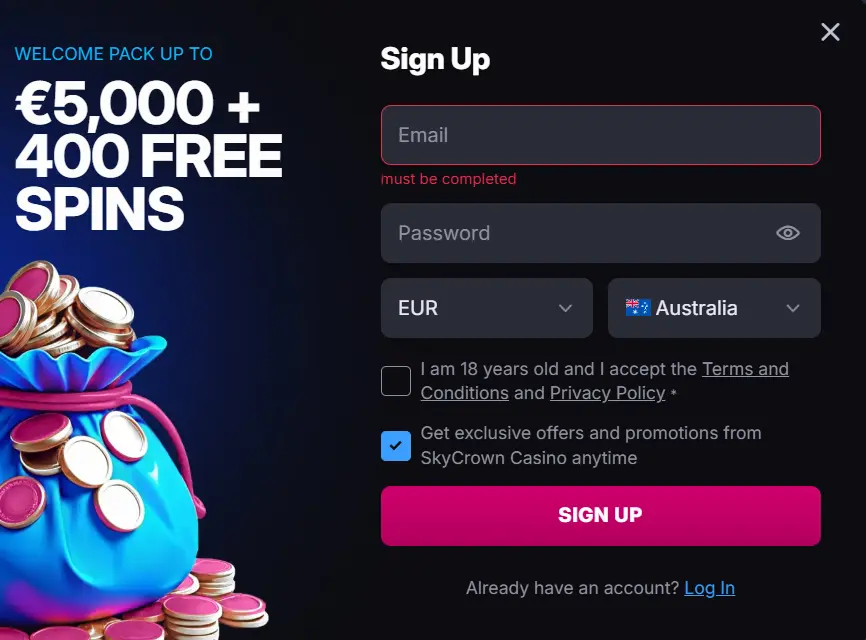
Start your SkyCrown Casino registration process with a click on the sign-up button. This takes you to our one-page registration form. Proceed by entering your email address, password, currency and country. Accept the terms before submitting the form and wait a bit for us to create your profile.
You need less than 2 minutes to create your account, and this is unchanged regardless of how you accessed SkyCrown. You’re signed in immediately after a successful SkyCrown Casino Online Login. The next step is to confirm your email address by clicking the link sent to your email.
We only accept players who are at least 18 years old. Although you attested to this earlier, we’ll later confirm this during your account verification. Locals can start playing instantly after funding their casino account. Skipping the verification for the time being is allowed.
Users will get up to 1,200 AUD and 125 free spins on their first deposit and the remaining part of the welcome package follows. We have multiple options for fiat and cryptocurrency payments, so it all depends on your choice.
Casino Account Verification
After your SkyCrown Casino Login Australia, proceed by uploading documents to confirm your identity, residency and payment method. The steps are:
- Click the menu and select “My Account”.
- Choose verification on the next page.
- Click upload on the verification type, choose the documents and complete the upload.
- Repeat step 3 for other verification types.
After the uploads are completed, we’ll verify your profile and notify you of the outcome. This can be either a success, a failed verification attempt or a request for more documents. The document uploaded must be clear, and the size must not exceed 10MB. We accept the following documents for each category.
| Identity | Passport, driving license or ID card |
|---|---|
| Residential address | Utility bill, bank statement or official document with your name and address |
| Payment methods | Card number, e-wallet account screenshot or bank statement |
| Phone number | Code sent to you via SMS |
Account verification is a mandatory requirement by the regulators. This process also enables quicker processing of deposits and withdrawals. It also helps us protect your profile and funds adequately, as we can quickly detect suspicious SkyCrown login attempts.
SkyCrown Casino Login Process for Australian Players
To log in to your account, you only need the email and password you registered with.
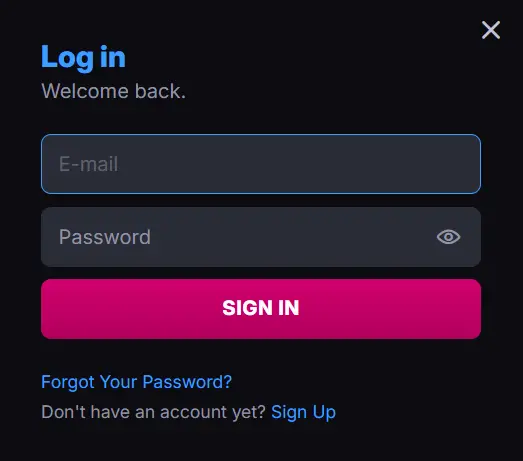
- Start sign-in procedure: You can access the login page by clicking the “Log in” button on our homepage. This opens our simple sign-in page.
- Enter your login details: You can proceed by entering your Sky Crown Casino Online Login credentials in the provided space. You only need your email and password.
- Submit the form: Check if the details are correct before clicking “Sign In” to submit it.
Users will gain instant access, provided the SkyCrown Australia login details are correct. The entire process takes less than one minute. We have the same login procedures for desktop and mobile users.
SkyCrown Login via Mobile App
Australians can log in to our mobile app by launching the application and clicking the Log in button. Proceed by entering your email and password on the sign-in page. Submit, and we’ll grant you immediate access if the details are correct.
SkyCrown Casino Australia login on our mobile application lets you play games from anywhere and at any time. You must have created an account with us and installed our application to use this method. Both the app installation and account creation are simple and fast.
To get our WPA application, visit our official website from your phone. Android users can click the menu bar and add the shortcut to their home screen. As for iOS users, a tap on the share icon on their home screen will help install the app. Another plus is that locals have quicker access to SkyCrown through the apps.
Personal Information for Players
As time goes by, we’ll need more details like your first name, last name, date of birth, gender, country, state, address and postal code. You can enter them under “General” in your profile. Make sure you save the details before exiting the page.
All these help us know you better. Remember, we only asked for email, password, currency and country during SkyCrown Casino registration. Also, we advise entering these details as they appear in your verification details. This will make your verification process easy and fast.
Lastly, we keep all your details safe using the SSL encryption technology. This prevents hackers from accessing your details. Also, we enable 2-factor authentication features to further fortify your account. Our privacy policy also ensures all details remain confidential.
Possible Sky Crown Login Issues for New Players
The first common Sky Crown Casino login Australia issue is entering the wrong password or email. Users will also encounter difficulties if the internet connection is weak or when the account is suspended. Lastly, all attempts to log in on a suspended account will be futile.
To correct these, you can always cross-check your email and password. Make sure they are accurate. If your network is poor, you can wait for it to improve or use a WiFi connection. For suspended accounts, you can easily contact our support team. We’ll review why your account is suspended and restore it if there is no serious infringement of the rules.
How to Delete an Account at SkyCrown Casino
You can delete your SkyCrown Casino account without stress. Just follow this step-by-step guide:
- Contact the support team: You can start by reaching out to our support team. This can be through the email or live chat channels.
- Make your intention known: Inform our representatives that you wish to permanently deactivate your account.
- Provide the necessary details: You will need to provide the email linked to the account and a few other required details.
- Wait for confirmation: Once the details are confirmed, our team will process the account deletion. You’ll be notified once the process is completed.
Users must know that any subsequent SkyCrown login attempts will fail once the account is deleted. All bonuses or ongoing rollovers are cancelled. Also, your balances will be sent to your account, and your data will be erased. Lastly, you will be denied a future attempt at Sky Crown Australia Login using the same details.
Password Recovery Instructions for Players
A player can recover their password by going to the SkyCrown Casino log in page. A click on the “Forgot Password” link shows a page that requests your email address. Enter your email, and you’ll receive a password recovery link. Proceed by clicking the link, which opens a page to enter and confirm your new password. That’s why you must provide the exact email used during your SkyCrown Casino sign up process. The entire process won’t take up to 3 minutes, and you should always keep your signing-in details safe.